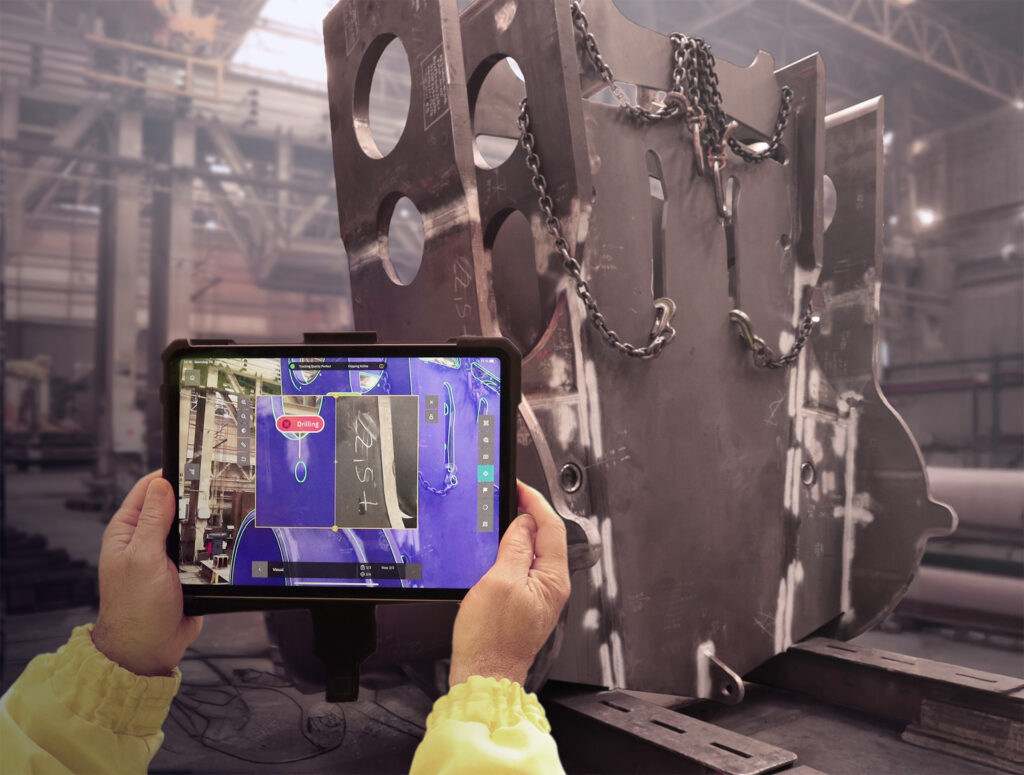

AR quality inspection with a tablet: the CAD model projected straight onto the manufactured part
How inspection with the Twyn app works and what it takes to deploy it in production.
How inspection with the Twyn app works and what it takes to deploy it in production.
Inspecting a large weldment still means much the same as it did twenty years ago: move the part to the measuring room, wait for a free machine, print a report. Augmented reality turns that around. The CAD model is projected over the real part on a tablet screen and you see deviations where the part actually stands – at the welding station, at goods-in, or at the end of the line.
The software behind this type of inspection is called Twyn and it is developed by the German company Visometry. AYES is its highest certified partner in the region, with dozens of deployments behind us, and we deliver the whole solution: from reviewing your inspection processes and building the business case, through 3D data preparation, hardware and device management, to training your people and connecting it to the rest of your production digitalisation
What is Twyn
Twyn is a software platform for visual quality inspection using augmented reality. It is developed by Visometry, a German company based in Darmstadt, which also stands behind the VisionLib tracking SDK – one of the strongest technologies on the market for recognising and tracking objects based on their CAD model.
The principle is simple: the tablet camera recognises the manufactured part, the software aligns its digital twin from CAD precisely onto it, and highlights the differences between design and reality directly in the image. The inspector immediately sees whether the part was made to drawing, whether anything is missing from the assembly, and whether every component is in its place.
The platform has two parts:
How an inspection works – four steps
No markers, no fixtures. Twyn recognises the part from the geometry of its CAD model, not from stickers attached to it. That removes both part preparation and the need for inspection templates – the most common reason AR never takes hold in production.
What Twyn can do
Where AR inspection makes sense
Twyn does not replace the measuring room. It replaces the large share of inspections where you are not measuring to hundredths of a millimetre, but verifying completeness, position and conformity with the drawing – and where classic metrology is unnecessarily slow or expensive.
Twyn and traditional inspection
| Criterion | AR inspection (Twyn) | CMM, hand gauges, templates |
|---|---|---|
| Where it happens | Anywhere – at the part, on the line, at goods-in | Measuring room, climate-controlled space |
| Part size | No limit, including large weldments | Limited by measuring table and fixture |
| Setup | CAD model, configured in minutes | Clamping fixtures, programming, machine time planning |
| Type of output | Visual comparison: completeness, position, shape | Precise dimensional and geometric tolerances |
| Documentation | Digital report with photos, instantly | Machine protocol, often handwritten |
| Operator training | Hours, no metrology background needed | Qualified metrologist |
| Where it is stronger | Fast and frequent checks, large and complex parts | Certified measurement to hundredths, tight tolerances |
In practice the two work side by side. Twyn catches most non-conformities immediately, and only what genuinely needs it goes to detailed metrology.
What it saves – a worked example
The most common question is not “how does it work” but “how much will it save us”. That can be calculated before you buy. The model below is based on a mid-sized engineering company inspecting weldments before assembly.
| Parameter | Today | With AR inspection |
|---|---|---|
| Inspections per month | 120 | 120 |
| Average time per inspection | 90 minutes | 30 minutes |
| Time spent on inspections per month | 180 hours | 60 hours |
| Moving parts to the inspection station | yes | eliminated |
| Time saved per month | — | 120 hours |
| Annual labour cost saving | — | ≈ EUR 34,500 |
Worked example for a mid-sized engineering company. Counts inspector time saved only, at an hourly rate of EUR 24. Excludes savings from catching non-conformities earlier – less rework, fewer complaints, less downtime in assembly.
The model counts only inspector time saved, at an hourly rate of EUR 24. It excludes savings from catching non-conformities earlier – less rework, fewer complaints and less downtime in assembly – which in practice tends to be the larger item.
A payback calculation is a standard part of our proposal. We build the model on your numbers – how many inspections, how long they take, what kind of parts – and add licence, hardware and training costs. For customers who inspect regularly and in volume, payback is typically a matter of months.
What about 3D scanning?
We get asked this by almost everyone, and many of our projects run at companies that already own a scanner. These are not competing methods – they answer different questions.
A 3D scan tells you by how much the part differs from the model. Twyn does not compete with that and is not meant to. Twyn answers whether the part is correct: whether anything is missing, whether anything is swapped, whether holes and welded features are where they should be, and whether this is the right variant of the part.
The difference is mainly the cost of a single inspection. Scanning means preparing the part, the scan itself, evaluation and a trained operator – on large weldments easily several hours. Twyn is handled by a shop-floor operator in minutes, without any metrology background.
In practice Twyn catches the vast majority of non-conformities right away, and only what really needs numbers goes to the scanner or the measuring room – a complaint, a disputed part, the release of a new series.
If you are weighing up whether AR inspection, scanning, or a combination of both fits your specific part, we will go through it with you.
What AYES delivers
Twyn is software. For it to work in production, the data preparation, hardware, processes and people all have to fit together. That is the part we handle.
References
We have AR quality inspection deployed at dozens of customers in the Czech Republic and Slovakia – from engineering companies through transport equipment manufacturers to automotive suppliers. They include Bednar FMT, one of the world’s agricultural machinery manufacturers, where inspection runs on tablets directly in production, as well as SOR Libchavy, DAKO-CZ and MCE Slaný. In every case these were parts and assemblies where conventional measurement is slow, expensive, or runs into the sheer size of the product.
How to start
Wondering whether AR inspection would work for you? Get in touch – we will go through one specific part together and tell you what to expect from Twyn and what not to.
| Get in touch |
Frequently asked questions
How accurate is Twyn?
Twyn is a tool for visual comparison, not a replacement for a coordinate measuring machine. It reliably reveals missing and misplaced components, shifted holes, incorrectly welded features or the wrong part variant. Certified measurement of tight tolerances stays with metrology.
Will Twyn replace a 3D scanner?
No, it solves a different task. A scanner measures deviations in numbers; Twyn verifies completeness and correctness in minutes and without a metrologist. Customers who have both use Twyn to catch most non-conformities immediately, and send to the scanner only what requires exact values.
Where is our design data stored?
The inspection runs offline, on the tablet itself, so data never has to leave your network. Visometry also holds the TISAX certification, the security standard required across the automotive industry.
What device does Twyn run on?
The Twyn View inspection app runs on iPads; project preparation in Twyn Studio runs on a standard work PC.
Do we have to mark the parts somehow?
No. Recognition works from the geometry of the CAD model – no markers or stickers needed.
What CAD data do we need?
Common industrial formats such as JT, STEP, CATIA or IGES. The model is optimised inside Twyn Studio, no additional software required.
How long does training take?
Using the app requires no metrology or AR background. An inspector is trained in a matter of hours; preparing engineers to build inspection projects takes longer.
Can we try Twyn out?
Yes, a trial version and a demo on your own part are both available. For longer evaluation in production we can provide licences and the tablet on a rental basis, so nothing has to be bought up front. Get in touch and we will arrange a date.